google garage digital marketing

Google Garage Digital Marketing: A Beginner’s Guide to Building Your Online Skills

Google Digital Garage and Digital Marketing: A Beginner’s Guide

Digital marketing can help businesses reach new customers, build stronger relationships and measure the impact of their campaigns. But for beginners, the range of channels and tools can feel overwhelming. Google Digital Garage has helped make the subject more accessible through free online learning resources designed to build practical digital skills.

What is Google Digital Garage?

Google Digital Garage is a learning initiative created by Google to help people develop digital skills. Its resources have included courses on digital marketing, data, careers and technology. Course availability and formats can change, so it is worth checking Google’s current learning platforms for the latest options.

One of its best-known offerings has been a beginner-level course covering the fundamentals of digital marketing. It introduces core concepts in straightforward language and is designed for people who are new to the subject, as well as business owners who want to improve their online presence.

What can you learn about digital marketing?

A digital marketing course may cover a range of topics, including:

  • Online strategy: setting goals, understanding your audience and choosing suitable channels.
  • Search engine optimisation: making website content easier for people to find through search engines.
  • Search advertising: understanding how paid search campaigns work and how they can reach people looking for particular products or services.
  • Social media: using social platforms to share content, engage with audiences and support business objectives.
  • Email marketing: building an opted-in audience and sending useful, relevant communications.
  • Analytics: using data to understand how people interact with a website or campaign.
  • Content and video: creating and sharing material that informs, entertains or supports customers.

The exact topics depend on the course. Digital platforms and their features change regularly, so learning materials are most useful when combined with current guidance and hands-on practice.

Who is it for?

Google Digital Garage resources are particularly useful for beginners, small business owners, students and people considering a career in digital marketing. They can also help employees broaden their skills or give business owners a clearer understanding of the work involved in promoting a brand online.

You do not usually need specialist knowledge to get started. A willingness to learn, access to the internet and a clear idea of what you hope to achieve are often enough.

Benefits of learning digital marketing online

Online courses offer flexibility: learners can often study at their own pace and revisit topics when needed. Introductory lessons can also provide a useful overview before someone invests in more advanced training or applies the ideas to a live project.

For a business, even a basic understanding of digital marketing can make it easier to set realistic objectives, ask informed questions and assess whether a campaign is delivering value. It can also help identify which channels are most relevant to customers, rather than trying to be everywhere at once.

Is a Google Digital Garage course enough?

A beginner course is a starting point, not a substitute for experience or a complete marketing strategy. Digital marketing involves testing, learning from results and adapting to changes in customer behaviour and technology. A course can introduce the principles, but applying them to a real business takes continued practice.

It is also important to distinguish between a course completion certificate and a professional qualification. Check the course details to understand what any certificate represents, whether it is accredited and how it may be viewed by employers.

How to make the most of a course

  1. Set a clear goal. Decide whether you want to promote a business, improve your CV or explore a new career.
  2. Take notes and put ideas into practice. Try applying each concept to a website, campaign or business example.
  3. Measure what matters. Connect activity to useful outcomes, such as enquiries, sales or sign-ups, rather than focusing only on likes or views.
  4. Keep learning. Use up-to-date resources to build on the foundations and stay aware of changes in the digital landscape.

Getting started

Google Digital Garage has made digital marketing more approachable by offering learning resources for people with different levels of experience. If you are new to the subject, an introductory course can help you understand the main channels, terminology and principles. For the best results, pair structured learning with practical experience and keep checking that the resources you use reflect current tools and guidance.


7 Essential Tips for Mastering Digital Marketing with Google Garage

  1. Set clear goals before starting a course.
  2. Choose lessons that match your business needs.
  3. Take notes on useful marketing ideas.
  4. Practise each skill with a small campaign.
  5. Use analytics to track what works.
  6. Keep your website mobile-friendly.
  7. Review and update your strategy regularly.

Set clear goals before starting a course.

Before starting a Google Digital Garage digital marketing course, set clear goals for what you want to learn and achieve. You might want to promote a small business, improve your job prospects or understand how online advertising works. Having a specific aim will help you focus on the most relevant lessons, put new ideas into practice and track your progress.

Choose lessons that match your business needs.

Choose lessons that match your business needs, rather than trying to cover every digital marketing topic at once. If your aim is to attract more local customers, focus on lessons about local search and online visibility; if you want to improve repeat sales, explore email marketing and customer engagement. Starting with the skills most relevant to your goals helps you put what you learn into practice sooner and make better use of your time.

Take notes on useful marketing ideas.

Taking notes on useful marketing ideas can help you turn what you learn through Google Digital Garage into practical action. Record key points, examples and questions as you work through each lesson, then note how an idea might apply to your business or goals. Organising your notes by topic—such as SEO, social media or email marketing—makes them easier to revisit when planning a campaign.

Practise each skill with a small campaign.

Practise each skill by putting it to work in a small, manageable campaign. For example, create a short social media promotion, write a simple email newsletter or improve one page of your website for search. Set a clear goal, decide how you’ll measure success and review the results afterwards. Small experiments help you build confidence, spot what works and learn from mistakes without committing a large budget.

Use analytics to track what works.

Use analytics to track what works. Reviewing website and campaign data can show how people find your business, which content they engage with and what leads to enquiries or sales. Focus on a few relevant measures linked to your goals, such as visits, sign-ups or purchases, and use what you learn to refine your marketing. Check results regularly, but allow enough time and data before deciding whether a change has made a difference.

Keep your website mobile-friendly.

Keep your website mobile-friendly so visitors can use it easily on smartphones and tablets. Make sure pages load quickly, text is readable without zooming, buttons are easy to tap and navigation is simple. Test your site on different screen sizes, and fix any features that are slow or difficult to use. A smooth mobile experience can help people find what they need and encourage them to get in touch or make a purchase.

Review and update your strategy regularly.

Review and update your digital marketing strategy regularly to keep it aligned with your business goals, audience needs and changes in the online landscape. Check your results using relevant measures, such as website visits, enquiries or sales, and identify what is working well and what needs improvement. Use these insights to adjust your content, channels and budget, then keep testing and learning so your strategy stays effective.
google digital marketing garage

Google Digital Marketing Garage: A Guide to Free Online Training

Google Digital Marketing Garage: A Guide to Google’s Free Online Training

Google Digital Garage has helped people and businesses build their digital skills through free online training. Its courses cover topics such as digital marketing, online business and career development, making the platform a useful starting point for anyone looking to improve their knowledge of the digital world.

Course names, content and availability can change over time, so check Google’s official learning platforms for the latest information before signing up.

What is Google Digital Garage?

Google Digital Garage is the name commonly associated with Google’s digital-skills training. It has offered online courses designed for beginners as well as people looking to develop existing skills. Lessons typically combine written guidance, videos and practical activities, allowing learners to study at their own pace.

Digital marketing has been a key area of interest. Training in this field can introduce learners to the main ways organisations attract and engage customers online, from search engines and social media to websites and email.

What can you learn?

Depending on the courses available, subjects may include:

  • Search engine optimisation (SEO): How to improve a website’s visibility in organic search results.
  • Search advertising: The basics of paid search campaigns and reaching people who are looking for particular products or services.
  • Social media marketing: How businesses can use social platforms to share content and connect with audiences.
  • Content marketing: Planning useful, relevant content that supports a business’s goals.
  • Email marketing: The fundamentals of communicating with customers by email.
  • Analytics: Understanding website and campaign data to assess performance and inform decisions.
  • Online business strategy: Setting goals, identifying audiences and choosing suitable digital channels.

Courses may also cover wider digital skills, such as using online tools, presenting a business on the web or preparing for work in a digital role.

Who is it for?

Google’s digital marketing training can be useful for small-business owners, freelancers, students, jobseekers and people considering a career change. It may also suit marketing professionals who want to refresh their understanding of core concepts or explore a new area.

Because introductory courses are generally designed to be accessible, previous marketing experience may not be necessary. However, the best results come from applying what you learn to a real project, such as a business website, a campaign idea or a portfolio exercise.

Are the courses free, and do they provide a certificate?

Google has offered free training through its digital-skills initiatives, but course access and certificate arrangements can vary. Some programmes may provide a certificate after completing the required lessons or assessments; others may not. Check the course details on Google’s official site to confirm the cost, eligibility requirements and whether a certificate is included.

A certificate can show that you have completed a course, but it is not a substitute for practical experience. Employers and clients may also want to see examples of your work and how you have used your skills to solve a problem.

How to get the most from a digital marketing course

  1. Set a clear goal. Decide whether you want to learn the basics, promote a business or prepare for a particular role.
  2. Study actively. Take notes, complete the activities and look up unfamiliar terms.
  3. Practise on a project. Apply each topic to a website, campaign or sample business idea.
  4. Review the results. Use suitable data to see what is working and where improvements are needed.
  5. Keep learning. Digital platforms and marketing practices change, so treat an introductory course as a foundation rather than a final qualification.

Is Google Digital Garage worth exploring?

For anyone seeking an accessible introduction to online marketing, Google Digital Garage and Google’s related learning resources can be a useful place to begin. They can help learners understand key terms, channels and techniques without needing to commit to a lengthy programme at the outset.

The most valuable approach is to combine structured learning with hands-on practice. Explore the current courses through Google’s official learning pages, choose a subject that matches your goals and put the ideas to work on a project of your own.


Exploring Google Digital Marketing Garage: Answers to 7 Common Questions

  1. Does Google offer free training?
  2. Is Google Digital Garage actually free?
  3. What does Google digital garage do?
  4. Does Google Digital Garage give you a degree?
  5. What is Google Digital Garage used for?
  6. Is a Google Digital Garage certificate worth doing?
  7. Is Google Digital Marketing Course worth it?

Does Google offer free training?

Yes, Google offers a range of free online training through its learning platforms, including courses on digital marketing and other digital skills. Course content and availability can change, so check Google’s official training pages for current options and whether a particular course includes a certificate.

Is Google Digital Garage actually free?

Yes, Google Digital Garage courses have generally been free to access, including many introductory digital marketing lessons. However, course availability and certificate options can change, and not every Google training programme is necessarily free. Check the course details on Google’s official learning site before enrolling to confirm any costs and whether a certificate is included.

What does Google digital garage do?

Google Digital Garage provides online training to help people develop digital skills, including digital marketing, search engine optimisation and online business. Its courses are designed for learners at different experience levels and can be studied at your own pace. Course content, availability and any certificates may change, so check Google’s official learning pages for the latest details.

Does Google Digital Garage give you a degree?

No, Google Digital Garage does not award a university degree. It offers online learning resources and, for some courses, a certificate of completion. These can help you develop digital marketing skills and demonstrate your learning, but they are not equivalent to a degree or formal academic qualification. Check the details of the specific course to confirm whether a certificate is available.

What is Google Digital Garage used for?

Google Digital Garage is used to help people develop practical digital skills through online training. Its courses have covered topics such as digital marketing, search engine optimisation, social media, online advertising and analytics, making them useful for beginners, business owners and anyone looking to strengthen their digital knowledge. Course content and availability can change, so check Google’s official learning pages for the latest options.

Is a Google Digital Garage certificate worth doing?

A Google Digital Garage certificate can be worth doing if you’re new to digital marketing and want a structured introduction to the basics. It can help demonstrate initiative and give you useful knowledge to apply to a business or personal project. However, a certificate alone is unlikely to secure a job or prove advanced expertise; practical experience, examples of your work and up-to-date skills are important too. Check the current course details, as certificate availability and requirements may change.

Is Google Digital Marketing Course worth it?

Yes, Google’s digital marketing course can be worth it if you’re new to the subject and want a structured introduction to key concepts and online tools. It can help you build foundational knowledge at little or no cost, although course content and certificates may vary. It’s not a substitute for hands-on experience or more specialised training, so you’ll get the most from it by applying what you learn to a real project and checking that the course matches your goals.

digital media advertising

Digital Media Advertising: A Practical Guide to Reaching the Right Audience

Digital Media Advertising: Reaching the Right Audience Online

Digital media advertising helps businesses promote their products, services and ideas across online channels. From search engines and social media to websites, apps and streaming platforms, it offers a range of ways to reach potential customers where they spend their time.

Unlike traditional advertising, digital campaigns can often be adjusted while they are running. Advertisers can use performance data to understand what is working, refine their messages and make better use of their budgets.

What is digital media advertising?

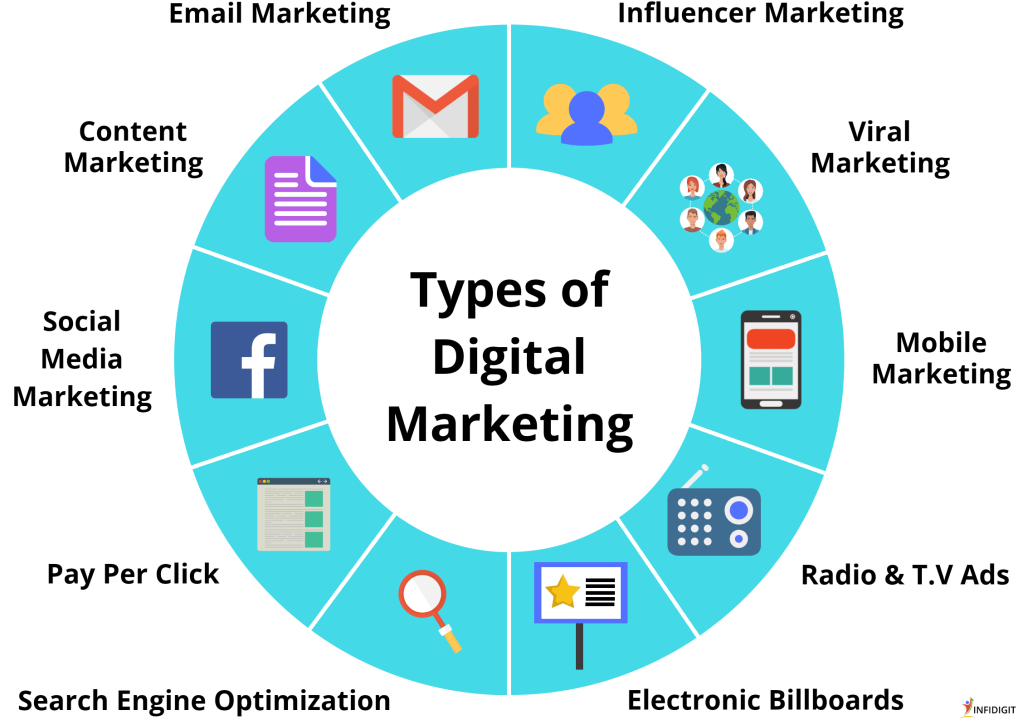
Digital media advertising is paid promotion delivered through digital channels. It includes formats such as search adverts, display banners, sponsored social posts, online video adverts and audio adverts on streaming services.

Each format serves a different purpose. A search advert can reach someone actively looking for a product or service, while a social media campaign may introduce a brand to people who have not encountered it before. The best choice depends on the campaign’s audience, objectives and budget.

Common types of digital advertising

  • Search advertising: Paid listings shown on search engine results pages, often in response to a relevant query.
  • Social media advertising: Sponsored content delivered on platforms such as Instagram, Facebook, LinkedIn and TikTok.
  • Display advertising: Visual adverts placed on websites, apps and other digital properties.
  • Video advertising: Short or long-form adverts shown before, during or alongside online video content.
  • Native advertising: Paid content designed to fit the look and feel of the platform where it appears, while still being clearly identified as advertising.
  • Audio advertising: Adverts delivered through digital radio, podcasts and music-streaming services.
  • Retail media: Advertising placed on retailers’ websites, apps or other channels, often aimed at shoppers researching or buying products.

Why businesses use digital media advertising

Digital advertising can help businesses increase awareness, attract visitors to a website, generate enquiries and encourage sales. Campaigns can be tailored to different locations, interests, search behaviours or stages of the customer journey, subject to platform rules and privacy requirements.

It also provides useful measurement. Depending on the channel and tracking set-up, advertisers may be able to review impressions, clicks, video views, conversions and the cost of achieving specific outcomes. These insights can guide improvements, although results should be interpreted carefully: not every valuable interaction is easy to measure, and a click does not always lead to a sale.

Building an effective campaign

Start with a clear objective

Decide what the campaign needs to achieve. Raising awareness, bringing visitors to a website and generating qualified leads require different messages and measures of success. A clear objective helps shape the channel mix and makes it easier to assess performance.

Understand the audience

Consider who the campaign is for, what they need and where they are likely to encounter relevant content. Audience research can help inform the tone, format and placement of adverts. Avoid relying on assumptions when customer feedback, search data or previous campaign results can provide stronger evidence.

Choose suitable channels and formats

There is no single channel that works for every business. Search advertising may suit people with a clear intention to buy, while video or social advertising can be useful for introducing a brand or explaining a more complex offer. A campaign can use several channels, but each should have a defined role.

Create relevant, clear adverts

Effective advertising communicates a useful benefit and gives people a clear next step. Keep copy concise, use visuals that support the message and make sure the advert leads to a relevant landing page. The experience should be consistent from the first impression through to the action you want someone to take.

Set a realistic budget

Plan spending around the campaign’s objectives, audience and duration. Leave room to test different messages or formats, but avoid making major decisions based on limited data. Costs and competition vary between channels, industries and audiences, so regular review is important.

Measurement and optimisation

Before launching a campaign, decide which indicators will show whether it is making progress. Depending on the objective, these might include reach, engagement, website visits, enquiries or sales. Use reliable tracking where appropriate, and check that the data is being collected and reported consistently.

Optimisation is the process of improving a campaign as information becomes available. This may involve testing alternative creative, adjusting bids, refining placements or improving a landing page. Make changes thoughtfully and allow enough time to understand their effects.

Privacy, transparency and trust

Digital advertising should be responsible as well as effective. Businesses must follow relevant data-protection and advertising rules, including requirements around consent, personal data and clear identification of paid content. In the UK, guidance from the Information Commissioner’s Office and the Advertising Standards Authority can help organisations understand their responsibilities.

Respectful advertising also means being honest about what is being offered, avoiding misleading claims and considering how targeting may affect people. Clear communication helps build trust and supports better long-term relationships with customers.

Making digital advertising work for your business

Digital media advertising is most effective when it is part of a considered marketing plan. Clear objectives, useful creative, suitable channels and careful measurement provide a strong foundation. By learning from results and keeping the audience’s needs in focus, businesses can make more informed decisions and improve their campaigns over time.


Exploring Digital Media Advertising: Key Questions and Insights

  1. What is an example of digital advertising?
  2. What are the 3 types of digital media?
  3. What are the four types of digital advertising?
  4. How is advertising done on digital media?
  5. What is digital digital advertising?
  6. What are the 4 types of advertising media?
  7. What are the 5 types of digital media?
  8. What is the best digital media advertising?

What is an example of digital advertising?

An example of digital advertising is a sponsored advert that appears on social media. A clothing retailer might promote a new collection in users’ feeds, with an image, a short message and a link to its online shop. The advert can be tailored to a relevant audience and its performance measured through views, clicks and sales.

What are the 3 types of digital media?

The three commonly recognised types of digital media are owned, earned and paid media. Owned media includes channels a business controls, such as its website, blog and social media profiles. Earned media is exposure gained through others, including customer reviews, shares, mentions and press coverage. Paid media is promotion a business pays for, such as search adverts, sponsored social posts and display advertising. Used together, these channels can help a business share its message, build trust and reach a wider audience.

What are the four types of digital advertising?

There is no single official classification, but four common types of digital advertising are search, display, social media and video advertising. Search adverts appear in search engine results, display adverts use banners or other visuals on websites and apps, social media adverts are paid posts shown on platforms such as Instagram or LinkedIn, and video adverts appear before, during or alongside online videos. These categories can overlap—for example, a video advert may also be a social media advert—so the best format depends on your audience and campaign goals.

How is advertising done on digital media?

Advertising on digital media is done by creating paid content and placing it on channels such as search engines, social media platforms, websites, apps and streaming services. Businesses choose an audience, set a budget and select a format—such as a search listing, banner, video or sponsored post—then publish the campaign through an advertising platform or media partner. Performance can be tracked using measures such as views, clicks, enquiries and sales, allowing advertisers to adjust their targeting, creative or budget while the campaign runs.

What is digital digital advertising?

Digital advertising (also known as digital media advertising) is the promotion of products, services or brands through online channels such as search engines, social media, websites, apps and streaming platforms. It can include paid search results, display banners, sponsored posts, video adverts and audio adverts. Businesses use digital advertising to reach specific audiences, raise awareness, attract website visitors or encourage sales, and can measure campaign performance using relevant data.

What are the 4 types of advertising media?

The four commonly recognised types of advertising media are print, broadcast, outdoor and digital. Print includes newspapers and magazines; broadcast covers television and radio; outdoor includes billboards, posters and transport advertising; and digital spans online channels such as search engines, websites, social media and streaming platforms. The categories can vary between marketing frameworks, and many campaigns combine several types to reach audiences in different ways.

What are the 5 types of digital media?

There is no single agreed list of the five types of digital media, but in marketing they are often grouped as owned, paid, earned, shared and converged media. Owned media includes channels a business controls, such as its website and email newsletter; paid media covers advertising it pays for, such as search or social adverts; earned media is coverage or recommendations gained through others; shared media is content circulated through social platforms and communities; and converged media is where these channels work together—for example, a paid campaign that sparks social sharing and leads people to a company’s website.

What is the best digital media advertising?

There’s no single “best” type of digital media advertising for every business. The right choice depends on your goals, audience and budget: search advertising can reach people actively looking for a product or service, while social media, display and video adverts can help build awareness and interest. Start with a clear objective, choose the channels your audience uses, and measure results so you can refine your approach over time.

How an Internet Marketing Specialist Can Help Your Business Grow

What Does an Internet Marketing Specialist Do?

An internet marketing specialist helps businesses attract, engage and convert customers online. They plan and manage digital campaigns, use data to measure performance and identify ways to improve results. Depending on a business’s goals, their work may cover search engines, social media, email, paid advertising and website content.

The role of an internet marketing specialist

Internet marketing brings together several channels and disciplines. A specialist may focus on one area, such as search engine optimisation (SEO), or coordinate activity across a broader digital strategy. Their role is to connect the right message with the right audience, then use evidence to understand what is working.

Typical responsibilities include:

  • Researching audiences, competitors and relevant search terms
  • Planning and managing digital marketing campaigns
  • Improving website content and user journeys
  • Creating or coordinating email and social media activity
  • Managing paid search and social advertising
  • Monitoring website traffic, leads, sales and other key metrics
  • Reporting results and recommending improvements

Key areas of internet marketing

Search engine optimisation

SEO aims to improve a website’s visibility in organic search results. This can involve researching keywords, improving page content, addressing technical issues and earning relevant links from other websites. SEO is a long-term activity: results often take time and depend on the competitiveness of a market.

Paid advertising

Paid campaigns can help a business reach potential customers through search engines, social media and other digital platforms. An internet marketing specialist may select audiences, write adverts, manage budgets and test different approaches. Regular monitoring helps keep campaigns relevant and makes it easier to see whether advertising is delivering value.

Content and social media

Useful content can answer customers’ questions, explain a service and build trust. Specialists may plan articles, landing pages, videos or social posts as part of a wider content strategy. The best format and channel depend on the audience and the purpose of the campaign.

Email marketing

Email can help businesses nurture relationships with existing and prospective customers. Campaigns might include newsletters, service updates or automated messages. Good practice includes sending relevant content, respecting consent and providing a clear way to unsubscribe.

Why businesses work with an internet marketing specialist

Online marketing channels change quickly, and it can be difficult for businesses to keep up while managing day-to-day operations. A specialist can bring focused knowledge, help prioritise activity and make better use of available time and budget.

They can also help ensure that different channels support the same business objectives. For example, a search campaign, a landing page and a follow-up email should work together to make the customer journey clear and consistent.

How to choose the right specialist

Look for someone who takes time to understand your business, customers and goals before recommending tactics. A good specialist should be able to explain their approach in plain language, describe how progress will be measured and set realistic expectations.

When comparing providers, consider:

  • Relevant experience: Have they worked with similar businesses or challenges?
  • Clear objectives: Can they connect their proposed activity to measurable business goals?
  • Transparent reporting: Will you understand what has been done and what the results mean?
  • Ethical practice: Do they follow platform rules and respect privacy and marketing permissions?
  • Communication: Are they responsive and clear about responsibilities, costs and timelines?

Measuring success

Success should be measured against the purpose of the campaign. Website visits may matter for an awareness campaign, while enquiries, bookings or sales may be more important for a conversion-focused one. Useful measures can include conversion rate, cost per lead, return on advertising spend and repeat customer activity.

Numbers need context. A rise in traffic is not necessarily valuable if visitors are not relevant, and a campaign may need time to produce meaningful results. Regular analysis helps a specialist understand performance and make informed adjustments.

Building a stronger online presence

An internet marketing specialist can help a business make its online activity more focused, consistent and measurable. The strongest results usually come from a clear strategy, a good understanding of customers and ongoing testing rather than a one-off campaign. With the right expertise and realistic objectives, digital marketing can become a practical part of sustainable business growth.


9 Essential Tips for Excelling as an Internet Marketing Specialist

  1. Understand your target audience.
  2. Set clear, measurable goals.
  3. Build strong SEO skills.
  4. Create useful, engaging content.
  5. Use analytics to guide decisions.
  6. Test campaigns regularly.
  7. Keep up with platform changes.
  8. Respect privacy and data laws.
  9. Communicate results clearly.

Understand your target audience.

Understanding your target audience is essential for an internet marketing specialist. Research who your customers are, what they need and how they make decisions, then use those insights to shape your messaging, content and choice of channels. The more relevant your marketing feels to the people you want to reach, the more likely it is to earn their attention and encourage them to take action.

Set clear, measurable goals.

Set clear, measurable goals before launching an internet marketing campaign so you can judge whether it is delivering results. Rather than aiming to “get more traffic”, set a specific target, such as increasing relevant website visits by 15% over three months or generating 20 qualified enquiries each month. Clear goals help an internet marketing specialist choose the right channels, allocate your budget effectively and track progress, while giving you a sound basis for refining the strategy.

Build strong SEO skills.

Building strong SEO skills is essential for an internet marketing specialist. A solid understanding of keyword research, on-page optimisation, technical SEO and link building can help improve a website’s visibility in search results and attract more relevant visitors. SEO is constantly evolving, so keep up with search engine updates, practise analysing performance data and focus on creating useful content that meets people’s needs.

Create useful, engaging content.

An internet marketing specialist should create useful, engaging content that answers customers’ questions and gives them a reason to spend time with your business. Focus on what your audience needs, whether that’s practical advice, clear explanations or helpful product information, and present it in an appealing format. Relevant, well-written content can build trust, encourage people to explore your website and support your wider marketing goals.

Use analytics to guide decisions.

Use analytics to guide decisions by regularly reviewing how people find and use your website, which campaigns generate enquiries or sales, and where potential customers drop off. Focus on metrics that relate to your business goals, rather than traffic alone, and use the insights to refine your content, targeting and budget. Testing changes over time helps an internet marketing specialist understand what works and make more informed, effective decisions.

Test campaigns regularly.

Test your internet marketing campaigns regularly to find out what resonates with your audience and what could work better. Try different headlines, images, calls to action or audience segments, changing one element at a time where possible. Track the results against clear goals, such as enquiries or sales, and use what you learn to refine future campaigns. Regular testing helps you make informed decisions and get more from your marketing budget.

Keep up with platform changes.

Keep up with platform changes to make sure your internet marketing strategies remain effective. Search engines and social media platforms regularly update their algorithms, tools and advertising policies, which can affect how your content reaches people. Follow official announcements and trusted industry sources, then review your campaigns and analytics to see whether any adjustments are needed.

Respect privacy and data laws.

An internet marketing specialist should respect privacy and data protection laws at every stage of a campaign. This means collecting only the information a business genuinely needs, explaining clearly how it will be used, storing it securely and obtaining valid consent where required—for example, before sending marketing emails or using non-essential cookies. Following UK GDPR and PECR requirements helps protect customers, build trust and reduce the risk of complaints or penalties.

Communicate results clearly.

An internet marketing specialist should communicate results clearly, using straightforward language and focusing on the measures that matter to the business. Explain what the data shows, how campaign activity contributed to the results and where there is room to improve. Clear, regular updates help clients understand the value of their investment and make informed decisions about what to do next.

hotel internet marketing

Hotel Internet Marketing: A Practical Guide to Attracting More Guests

Hotel Internet Marketing: A Practical Guide to Attracting More Guests

Hotel internet marketing is the way a hotel uses online channels to reach potential guests, build trust and encourage bookings. It covers everything from a well-designed website and search engine visibility to social media, email and online reviews.

A strong marketing plan helps a hotel stand out in a crowded market. It can also encourage more guests to book directly, while supporting visibility on online travel agencies (OTAs) and other booking platforms. The key is to make each part of the online experience useful, consistent and easy to act on.

Build a website that turns visits into bookings

A hotel website is often the first place a potential guest goes after discovering a property. It should quickly answer the questions that matter: where the hotel is, what the rooms are like, what facilities are available and how much a stay might cost.

Make sure the website:

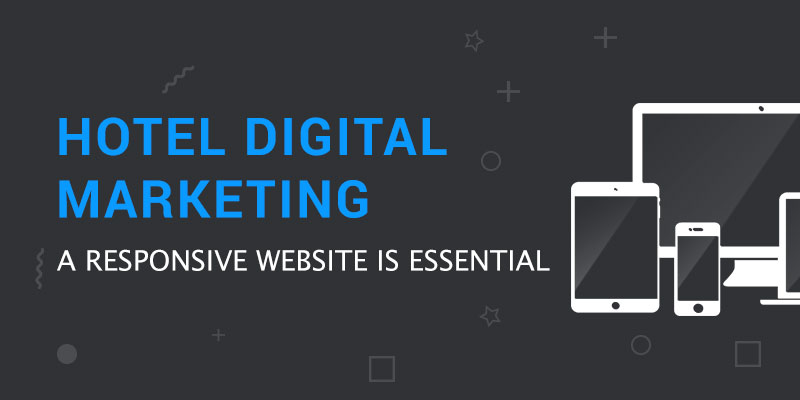
  • Works smoothly on mobile phones, tablets and desktop computers.
  • Displays clear, up-to-date room descriptions, photographs and facilities.
  • Makes rates, availability and booking options easy to find.
  • Explains the hotel’s location, transport links and nearby attractions.
  • Includes clear contact details and answers to common questions.
  • Loads quickly and offers a straightforward, secure booking process.

Strong photography can help guests imagine their stay, but it should accurately represent the property. Clear information and an uncomplicated booking journey build confidence and reduce the chance that a visitor will leave to look elsewhere.

Improve visibility in search engines

Search engine optimisation (SEO) helps a hotel appear when people search for relevant accommodation. That might include searches for a hotel in a particular town, a place to stay near a venue, or accommodation with specific facilities.

Start by identifying the phrases prospective guests are likely to use. Create useful pages around the hotel’s location, rooms, facilities and guest needs. For example, a hotel could provide practical information about parking, family stays, accessible rooms or nearby event venues—where these are genuinely relevant.

Local SEO is especially important for hotels. Keep the hotel’s name, address and telephone number consistent across its website and business listings. Complete and maintain its Google Business Profile, including opening information, photographs and a link to the official website. Encourage guests to leave honest reviews and respond to them professionally.

SEO takes time. Focus on accurate information and helpful content rather than trying to repeat keywords unnaturally or promising instant results.

Use online travel agencies strategically

OTAs can introduce a hotel to people who may not otherwise have discovered it. They can be particularly useful for reaching international travellers and guests comparing several properties. However, bookings through third-party platforms may involve commission and give the hotel less control over the guest relationship.

Rather than treating OTAs and direct bookings as an either-or choice, consider how they can work together. Keep listings accurate, use compelling imagery and monitor performance by channel. Make the hotel’s own website an attractive option too, with clear information, a reliable booking experience and benefits that are genuinely available to direct customers.

Any direct-booking offer should be clear and easy to understand. Depending on the hotel, this could include a flexible rate, a small added extra or a package tailored to a particular type of stay. Check the terms of third-party agreements before advertising rate comparisons or exclusive offers.

Make reviews part of the marketing plan

Reviews influence how prospective guests assess a hotel. They also offer useful insight into what guests value and where the experience could improve.

Invite guests to share feedback after their stay without pressuring them to leave a positive review. Reply to reviews in a timely, considered way. Thank guests for positive feedback and address criticism calmly, acknowledging the concern and explaining any appropriate next steps. Avoid sharing personal or booking details in a public response.

Patterns in reviews can be valuable. If guests repeatedly mention a particular strength, consider featuring it in relevant marketing. If they raise the same concern, work with the team to address the underlying issue rather than relying on a response alone.

Share the hotel’s story on social media

Social media can help a hotel showcase its atmosphere, people and surroundings. Useful content might include room and restaurant photography, local recommendations, seasonal events, behind-the-scenes moments and updates about facilities.

Choose platforms that suit the hotel and its audience instead of trying to post everywhere. A consistent schedule is more useful than a burst of activity followed by long periods of silence. Use captions that provide context, check image permissions and respond to genuine questions and comments.

Social media is not only a sales channel. It can help potential guests understand what makes the hotel distinctive and give past guests a reason to stay connected.

Use email to encourage repeat stays

Email marketing can keep a hotel in touch with past guests and people who have chosen to receive updates. Messages could include seasonal packages, local events, new facilities or ideas for a return visit.

Keep emails relevant and focused. Use clear subject lines, make the main offer easy to understand and include a direct route to find out more or book. Follow UK data protection and electronic marketing rules, including obtaining the appropriate consent and providing a simple way to unsubscribe.

Where possible, tailor messages to guests’ interests or previous stays, while using personal information responsibly. A thoughtful, occasional email is more likely to be welcomed than frequent messages with little value.

Consider paid search and social advertising

Paid advertising can help a hotel reach people who are actively looking for accommodation or are likely to be interested in a particular type of stay. Search adverts may be useful for location-based searches, while social advertising can promote packages, facilities or seasonal campaigns.

Set a clear objective before spending money. Decide whether the campaign is intended to generate bookings, promote an event or increase awareness of a new offer. Use relevant landing pages, define a budget and track what happens after someone clicks. Review performance regularly and adjust targeting, creative and spend based on results.

Measure what matters

Website visits alone do not show whether marketing is working. Choose measures that connect to business goals, such as:

  • Website enquiries and completed direct bookings.
  • Conversion rates and booking abandonment.
  • Revenue and average booking value by marketing channel.
  • Performance of specific offers or campaigns.
  • Review volume, ratings and common feedback themes.
  • Repeat bookings and email engagement.

Use analytics and booking-system data to understand how guests discover the hotel and what helps them make a decision. Ensure tracking is set up appropriately and respects privacy requirements. Comparing results over time can reveal which activities deserve more attention and which need to change.

Bring the guest experience and marketing together

The most effective hotel internet marketing reflects the real experience of staying at the property. Promises in adverts, website copy and social posts should match what guests find on arrival. When marketing and service are aligned, it is easier to earn positive feedback, repeat visits and recommendations.

Begin with the basics: a helpful website, accurate listings, a considered review process and a clear way to measure bookings. Then build on those foundations with relevant content, email and carefully managed advertising. A consistent approach can help a hotel reach the right guests, communicate what makes it special and turn online interest into a rewarding stay.


8 Essential Tips for Enhancing Hotel Internet Marketing Success

  1. Optimise the hotel website for mobile bookings.
  2. Use local keywords to improve search visibility.
  3. Keep room rates and availability up to date.
  4. Showcase guest reviews across key channels.
  5. Post fresh photos and offers on social media.
  6. Make booking simple with clear calls to action.
  7. Use email campaigns to encourage repeat stays.
  8. Track campaign results and adjust your approach.

Optimise the hotel website for mobile bookings.

Optimise the hotel website for mobile bookings by making it fast, easy to navigate and simple to use on a smaller screen. Keep room details, prices and availability clear, and make the booking button easy to find without excessive scrolling. Use short forms, mobile-friendly payment options and clear confirmation messages to reduce friction at every step. Regularly test the full booking journey on different devices so guests can reserve a stay quickly and confidently, wherever they are.

Use local keywords to improve search visibility.

Use local keywords to help your hotel appear in searches from people planning a stay in your area. Include your town, neighbourhood and nearby landmarks naturally in your website copy, page titles and descriptions—for example, “boutique hotel in Bath” or “accommodation near Edinburgh Waverley Station”. Focus on phrases that reflect what guests are actually looking for, and make sure the information is accurate and useful rather than simply repeating place names.

Keep room rates and availability up to date.

Keep room rates and availability up to date across your website and booking platforms so guests can see accurate information and book with confidence. Check that prices, room types, restrictions and availability match across channels, and update them promptly when circumstances change. Inconsistencies can frustrate potential guests, lead to abandoned bookings or create avoidable problems after a reservation is made.

Showcase guest reviews across key channels.

Showcase genuine guest reviews across your website, social media and other relevant marketing channels to help prospective visitors feel confident about booking. Choose recent, representative feedback that reflects what makes your hotel special, and always present it accurately and with permission where required. Respond to reviews professionally, including constructive criticism, to show that you value guest feedback and are committed to improving the experience.

Post fresh photos and offers on social media.

Post fresh photos and offers on social media to give potential guests a timely glimpse of what makes your hotel worth visiting. Share authentic images of rooms, dining, facilities and nearby attractions, alongside seasonal packages or special events. Keep details accurate, make the offer easy to understand and include a clear link to find out more or book. Regular, relevant updates help keep your hotel visible and give followers a reason to engage.

Make booking simple with clear calls to action.

Make booking simple by showing guests exactly what to do next. Use clear, visible calls to action such as “Check availability” or “Book your stay”, and place them where visitors are likely to need them, including on room pages and mobile screens. Keep the booking process straightforward, with as few steps as possible and no unexpected costs, so guests can move from browsing to confirming their stay with confidence.

Use email campaigns to encourage repeat stays.

Use email campaigns to keep your hotel in touch with past guests and encourage them to book again. Send occasional, relevant updates featuring seasonal offers, local events or experiences that suit their interests, with a clear link to your booking page. Make each message useful rather than overly sales-focused, and ensure recipients have agreed to receive marketing emails and can unsubscribe easily.

Track campaign results and adjust your approach.

Track the results of each marketing campaign to understand what is attracting guests and generating bookings. Monitor useful measures such as website visits, enquiries, booking conversions and revenue, and compare performance across channels. Use these insights to refine your approach: invest more in activities that deliver results, improve underperforming campaigns and test changes to messaging, offers or targeting. Regular reviews help ensure your marketing stays relevant and makes the best use of your budget.